 Orien
Orien
A free eye gaze AAC app you can hand a family today
Orien turns an iPhone with Face ID into an eye gaze communication device. No calibration, no account, no cost. It's a bridge while your patient waits on an evaluation, insurance approval or a dedicated device.
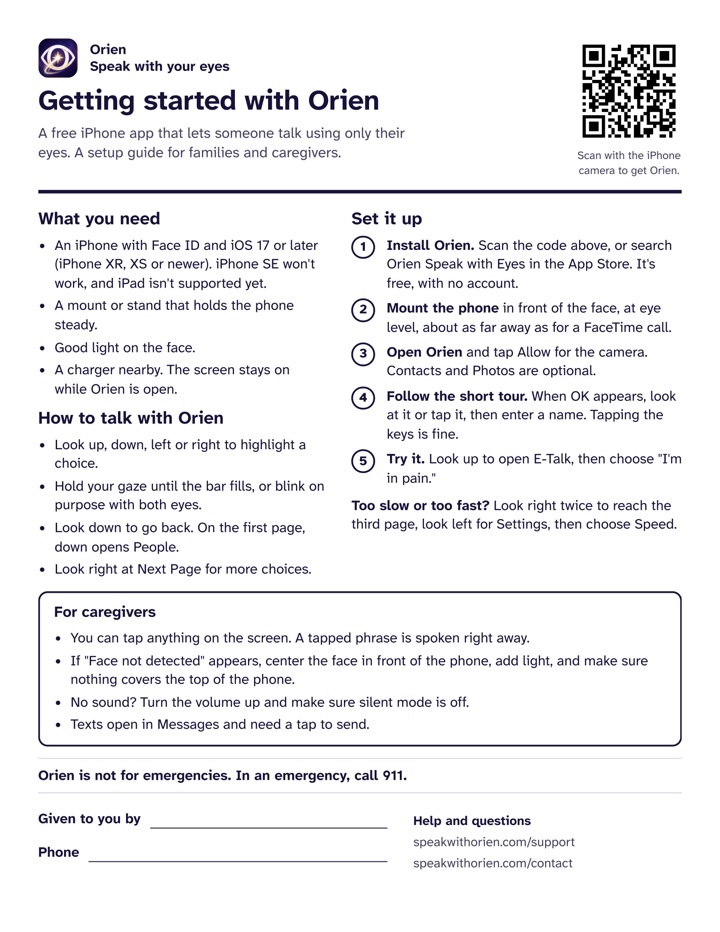
One page. Prints well in black and white.
Where Orien fits
Orien is a bridge, not a replacement. A full AAC evaluation and a dedicated eye gaze device are still the right path for many people.
A good fit
- While waiting on an AAC evaluation, insurance approval or device delivery.
- As a backup or second device: at the bedside, in the car, or when the main device is charging or in for repair.
- For people who don't qualify for a funded device, or whose family can't wait.
- Early on, to get comfortable with eye gaze before speech or hand use declines.
Look elsewhere when
- The person needs a large vocabulary, fast typing or full device control. A dedicated eye gaze device or iOS Eye Tracking is a better match.
- Looks up, down, left and right aren't reliable.
- They don't have an iPhone with Face ID. iPhone SE won't work, and iPad isn't supported yet.
- They need a way to call for help in an emergency. Orien isn't an emergency system.
Feature matching at a glance
What Orien does today, version 1.0, so you can match it to your patient.
- Access method
- Eye gaze through the iPhone's Face ID (TrueDepth) camera, using Apple's face tracking. Orien follows the eyes, not the head. Touch works at any time.
- Calibration
- None. Open the app and start, then fine tune speed and sensitivity in Settings.
- Targets
- At most four large targets per screen, one at each edge, instead of a pointer aimed at small buttons. The same four moves work on every screen. The middle of the screen selects nothing, and inside a menu, looking down goes back.
- Selection
- Dwell until the bar fills, or a deliberate blink with both eyes (0.15 to 0.6 seconds). Both are always on in this version.
- Speed
- Standard, Fast, Expert or Instant, changed in Settings by gaze or touch. On Standard, opening a menu takes a 3 second dwell and speaking a phrase takes about 6.5 seconds.
- Sensitivity
- How far the keyboard's gaze dot moves for a given eye movement. Horizontal and vertical are set separately, from 0.2 to 4.0 (default 1.0), to match eyes that move more easily one way than the other.
- Spelling
- An eye controlled keyboard with a gaze dot and a 1 second dwell per key.
- Vocabulary
- Urgent phrases come first: "Help me now," "I'm in pain," "Call someone" and "Stop." Then needs (food, drink, bathroom, comfort, position, medical), feelings with pain location (head, chest, stomach, back, legs), requests (TV, lights, music), greetings, yes, no and maybe, questions, and personal information.
- People
- Speaks a contact's name with a phrase, like "Mom, can you come here?" Prepares texts in Apple Messages; sending needs a tap. No phone calls.
- Speech output
- On the device, in any installed English iOS voice. Personal Voice isn't supported in this version.
- When the face is lost
- Selection pauses, and Orien shows and says "Face not detected." Touch still works.
- Training
- A guided tour on first launch, which you can replay from Settings.
- Devices
- iPhone XR, XS or newer with Face ID, on iOS 17 or later. Not iPhone SE. iPad isn't supported yet.
- Cost and privacy
- Free. No account, ads, analytics or servers. Nothing leaves the phone.
- Classification
- A communication aid. Not a medical device, and not an emergency service.
Try it in one visit
About 15 minutes, on the family's own iPhone.
Install OrienSearch "Orien Speak with Eyes" in the App Store, or scan the code on the handout. It's free, with no account.
Position the phoneMount it at eye level, in front of the face, about as far away as for a FaceTime call. Put light on the face, with no bright window behind.
Allow the cameraContacts and Photos are optional.
Run the guided tourWhen OK appears, look at it or tap it, then enter a name. You can tap the keys. Orien walks through each area in about two minutes.
Try the urgent phrasesLook up to open E‑Talk and choose "I'm in pain." Watch for misfires and how long each selection takes.
Set the speedSettings is on the third page, on the left. Start on Standard and move to Fast as accuracy holds.
Send the handout homeWrite your name and number at the bottom so the family knows who to call.
The family handout
One printable page that covers what a family needs, five setup steps, tips for caregivers, and a line for your name and number. Share it as often as you like.
Questions clinicians ask
Is Orien a speech generating device that insurance pays for?
No. Orien is a free app, so there's nothing to bill and no paperwork. It can run alongside the process of getting a funded speech generating device, and serve as a backup once that device arrives.
Does Orien need calibration?
No. Orien reads the direction of each eye from the Face ID camera and maps it to four large targets, so there's no calibration step. Instead, Settings offers four selection speeds and separate horizontal and vertical sensitivity for the keyboard's gaze dot.
Does Orien collect patient data?
No. Orien has no accounts, analytics or servers, and the app contains no networking code. Camera images, face data and messages stay on the phone. There is no patient information for us to receive.
What if my patient's eye movement is limited?
Orien needs reliable looks up, down, left and right. If that isn't possible, a dedicated eye gaze device or switch access is the better fit today. We're exploring options for reduced eye movement, and clinician input shapes them.
Can my patient text or call someone with Orien?
Orien can speak a message to someone by name, like "Mom, can you come here?", and prepare a text in Apple Messages. iOS requires a tap to send the text. Orien doesn't place phone calls.
Is there a cost to share the family handout?
No. Print it, copy it and hand it out as often as you like. It's one page and prints well in black and white.
Work with us
Orien is new, and clinicians shape what comes next. If you try it with a patient, we'd like to hear what worked, what didn't and what's missing.
We're also looking for ALS clinics and speech therapists to partner on a study of how well Orien works for people with ALS.